VRAM Capacity Decisions and the Midrange Builder Squeeze
Modern game engines demand more VRAM than midrange GPUs typically offer.

Midrange GPU buying is now a VRAM capacity decision as much as a performance decision. The squeeze comes from high prices and a structural mismatch between deliberately tiered memory capacities and the demands of modern game engines. To buy a card that will last, start with the resolution and how long it needs to last, then weigh physical memory against software features at current street prices.
Why midrange GPU buyers face a structural problem, not a temporary one
GPU product lines split buyers by how much memory they get as well as processing power. Nvidia’s 128-bit memory bus constrains the RTX 5060’s configuration to 8GB or 16GB, with no middle option in that design. That is a physical constraint, but the choice to keep the entry card at 8GB also protects the more expensive RTX 5060 Ti 16GB.
AMD and Intel have shipped 12GB and 16GB cards for less than Nvidia’s 8GB tier, showing that a low-cost GPU can have more memory. Meanwhile, 8GB moved from generous in 2016 to adequate by 2020, then to a capacity requiring heavy optimization in 2026. The RTX 3060 Ti launched in December 2020 at $399 with 8GB on a 256-bit bus. Five years later, the RTX 5060 Ti 8GB arrived with the same capacity on a 128-bit bus, leaving memory headroom unchanged despite the intervening demands of new games.
How game engines have outrun the 8GB tier
Indiana Jones and the Great Circle checks VRAM before it lets the player use texture-pool settings, with no way to override the check as the player could with a warning. Some 8GB configurations cannot enable certain options at all. DOOM: The Dark Ages also lists an 8GB minimum, yet filling that buffer during demanding play can make the experience unplayable.
Current AAA titles can use as much as 8–10GB at 1440p Ultra with textures and ray tracing. When an 8GB card overflows into system RAM, the consequences include a lower average frame rate, frame-time spikes and broken frame pacing. A short benchmark pass may miss what happens in a demanding scene. Some workloads can still fit in memory with the right texture-pool settings, so every configuration does not fail in the same way. Buyers lose margin when the desired settings no longer fit.
Console development helps explain that pressure. PS5 and Xbox Series X both have 16GB of unified memory, so studios start with a different memory baseline than they would with an 8GB PC graphics card. Unified memory shapes the systems developers target. Red Dead Redemption 2, Battlefield 1, DOOM (2016), and The Witcher 3 show that games can look great with smaller memory budgets. That proves optimization is possible while leaving open whether next year’s desired games will receive enough of it to rescue an undersized purchase.
Why Nvidia's software answer — DLSS, Frame Generation, Neural Texture Compression — doesn't close the gap
DLSS 4.5 Super Resolution delivers superior image quality and has broad availability through game support or Nvidia App overrides. Rendering at a lower internal resolution can shrink frame buffers. However, DLSS also needs memory for its model and buffers, so at 1080p those costs and savings often roughly cancel out.
Frame Generation makes that distinction more important. Enabling DLSS Frame Generation or FSR 3 Frame Generation requires additional frame storage. A workload already using 7.5GB at native resolution can rise to 8.2–8.5GB with Frame Generation, exceeding an 8GB card’s capacity. The resulting microstutter undermines the smoother output the feature is meant to provide. Buyers who most need the performance uplift can therefore face the tightest constraint on using it.
Neural Texture Compression offers a different route by using small neural networks to compress textures more efficiently than BC7. Demos show that it works, but how well it will work on 8GB cards is still unclear. It also requires studio adoption, returning the buyer to the same dependency as conventional optimization. If a few studios make 8GB work well enough, there may be less pressure to add memory to the next 60-class card, while other games still need more. Software can stretch a budget, but its benefits remain conditional when the buffer is full.
Where the Steam installed base actually stands — and what it reveals about the upgrade lag
Valve’s Steam Hardware Survey shows that many gamers still use midrange GPUs that are several years old. In July 2026, a majority of surveyed PC gamers had at least 10GB of VRAM for the first time since Valve began publishing monthly data. The survey also showed 16GB cards passing 8GB cards, then gaining more than a full percentage point in a single month. By September 2026, the RTX 5070 had reached the top individual GPU slot after a sharp monthly increase. These changes show an installed base crossing into higher-capacity territory.
The platform breakdown qualifies that result without reversing its direction. On Windows alone, 8GB remains the most common VRAM configuration. The totals also include macOS and Linux, where integrated graphics have a different effect on the numbers. Builders should understand that distinction when using the overall trend to inform a purchase. The useful signal is the direction of replacement, because a card bought today must serve through the upgrade cycle.
The RTX 5060 launch as a case study in how the squeeze reaches the buyer
The RTX 5060 brought the capacity trade-off directly to the purchase decision. It launched at the same MSRP as the RTX 4060, broadly preserving the price position the 60-class had occupied for the better part of a decade. Yet its 8GB configuration faced an Intel Arc B580 with 12GB for less and an RX 9060 XT 16GB with twice the memory for a modest premium.
Limits on review access at launch also left buyers with less to go on. The “Forbidden Review” episode illustrates why buyers need more than launch messaging to judge a card whose advertised features depend on spare memory. Native rasterization results placed the RTX 5060 below the four-year-old RTX 3060 Ti, making the software proposition especially important. That proposition still had to contend with the same 8GB ceiling. Buyers still need to establish the limits of those valuable features before paying.
A reported 9GB RTX 5060 refresh leaves that question open. It is not an announced product, and the reported narrower bus would introduce a bandwidth trade-off. A higher capacity number alone would not describe the whole change. If the aim were to ease the 8GB controversy while preserving the RTX 5060 Ti 16GB’s position, that configuration would do less to disturb the product tiers than a genuine 12GB or 16GB alternative.
How the squeeze maps to resolution targets and budget brackets
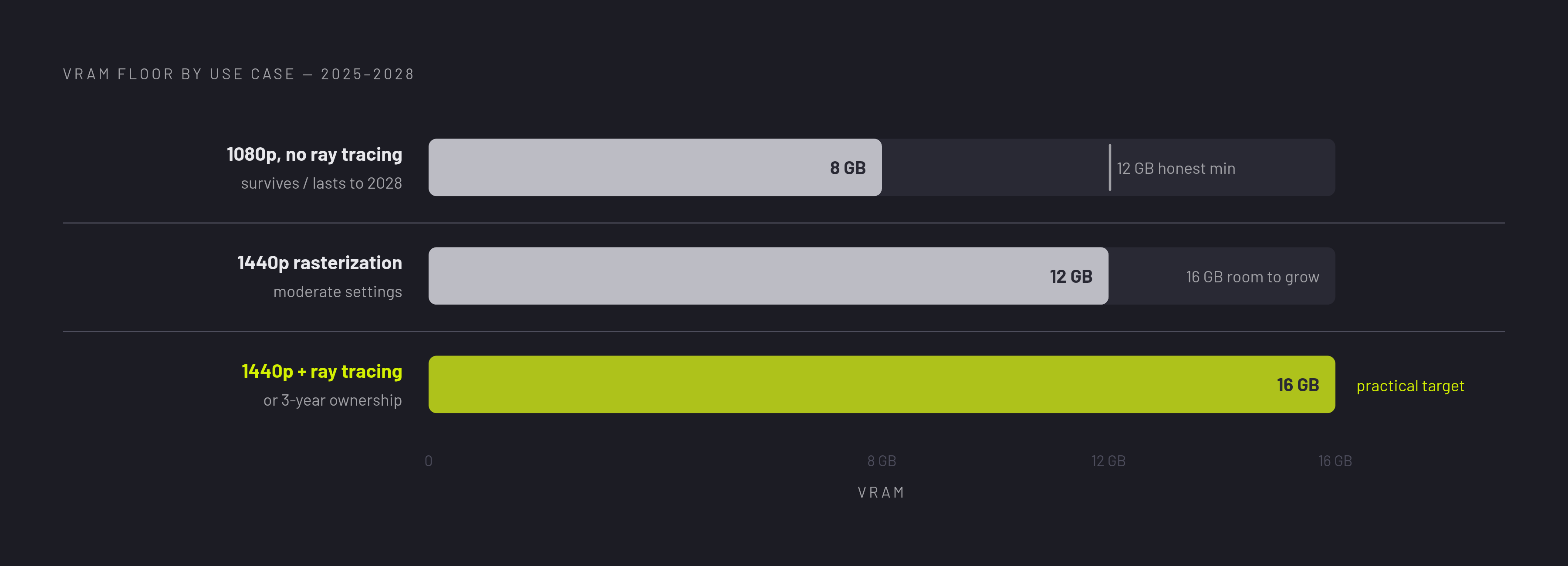
Resolution should set the memory floor before a buyer compares raw rasterization performance. At 1080p, 8GB is a bare minimum for current AAA games and requires careful settings management. At 1440p with rasterization, 12GB generally meets the floor, while 16GB provides headroom against texture growth and overflow. 16GB is the safer target for buyers who plan to use ray tracing or keep the card for three years. These are workload boundaries rather than guarantees that every game uses the same amount of memory.
The Intel Arc B580 supplies 12GB GDDR6 at the lower-priced end of that decision. It averages around 86 FPS at 1440p across a mixed game selection and beats the RTX 4060 at 1440p Ultra for less money, although its street price has risen above launch MSRP. PCIe 4.0 is strongly recommended because PCIe 3.0 systems lose meaningful performance. Heavy streaming workflows are a weaker fit because Intel’s ecosystem is less mature. Its value depends on capacity, the whole system and workload.
The RX 9060 XT 16GB makes a strong case for 1440p rasterization, with enough memory to avoid the 8GB capacity cliff. It also beats the higher-MSRP RTX 5060 Ti 8GB by a significant margin at 1440p and higher resolutions in head-to-head testing. By contrast, the RTX 5060’s strongest case is access to the DLSS ecosystem for buyers committed to that workflow. For ray-traced and path-traced games, the RTX 5060 Ti 16GB combines that software depth with a more suitable memory budget. Nvidia’s Ray Reconstruction is supported in many games, which matters here, while AMD’s Ray Regeneration is available in two titles as of October 2026.
Card selection must also fit the build. Case clearance, PSU requirements, and PCIe slot generation can invalidate an otherwise sound capacity decision. A visual planning tool with a 3D configurator and compatibility checker serves this stage by placing the card in the context of the actual case and surrounding components. The purpose is to connect the resolution budget to a workable system, rather than finish with an isolated GPU recommendation.
The pricing environment that makes every VRAM decision harder right now
The AI-driven DRAM shortage compounds the capacity squeeze by pushing midrange street prices above MSRPs. As a result, the relationship between memory and price can change within weeks of a guide’s publication. A card that offered strong VRAM value at launch may no longer hold that position at checkout. The true entry point into capable 1440p gaming has also shifted upward, putting pressure on the rest of the build budget. Better capacity is available, but the cost of reaching it is less predictable.
AMD’s prices have risen less than Nvidia’s, with the RX 9070 GRE standing out in October 2026 as the only card selling close to MSRP. That does not make any launch-price comparison sufficient for a purchase. Builders should check live prices across retailers while configuring the system, including both GPU and RAM costs. Real-time multi-retailer price comparison is useful precisely because it prevents a stale guide from setting the budget. The relevant measure is VRAM value at the price available now.
Making a VRAM decision you won't regret: the practical framework
Start with the monitor target and expected ownership period. A 1080p/144Hz system needs meaningfully less GPU than a 1440p/144Hz system, so buying beyond the monitor’s capability can waste budget. Buying below the memory floor is a slower version of the same mistake. If a 1440p monitor upgrade is planned within two years, use that resolution to set the GPU requirement now.
Then establish a capacity minimum before weighing brands. For 1080p without ray tracing, 8GB remains survivable, but 12GB is the honest minimum for a card expected to last through 2028. For 1440p rasterization at moderate settings, 12GB meets the floor and 16GB leaves room for textures to grow. For 1440p with ray tracing or a three-year ownership window, 16GB is the practical target. A rumored increase to 9GB would not change the recommendation for builders planning past 2027.
Next, weigh software against memory at current prices. Nvidia’s DLSS 4.5 Super Resolution, Ray Reconstruction in 30 games, and Reflex in 300-plus titles provide genuine depth. The RTX 4080 still receiving DLSS 4.5 updates in 2026 illustrates how that support can extend through ownership. A ray-tracing-heavy, DLSS-enabled library can justify Nvidia’s premium, while rasterization and open-world gaming strengthen the capacity-per-dollar case for AMD’s RX 9060 XT 16GB and RX 9070.
Finally, verify PCIe generation, PSU requirements, case clearance, and slot clearance before purchase. Visualizing the selected GPU within the actual build can catch mistakes that memory research cannot resolve. Steam’s share of 12GB cards is growing, led by the RTX 5070 and Arc B580, and is on pace to pass 8GB within a year, so 12GB itself is a step along the way. Builders choosing 16GB today are buying ahead of that trend.