The Peripheral Layer Problem in Modern Build Configurators
Planning the monitor and peripherals first makes the tower smarter.

A desk setup and battlestation aesthetic planner should account for the monitor, peripherals, desk space, and tower before anything is bought. The peripheral layer problem in modern build configurators is that these decisions are usually separated, even though they share one budget and determine each other’s performance. Planning the whole setup from the start makes the hardware choices inside the tower more accurate and the desk more attractive.
How configurators define the scope of a build — and why that definition has consequences
Configuring a PC usually starts with choosing a CPU and GPU, then filling in RAM, storage, cooling, and a case. The tool gathers those parts into a build and checks how they fit together. The scope feels natural because the parts share a chassis. Everything outside it has to be bought on its own. The display, keyboard, mouse, and desk setup sit beyond the boundary of what counts as the computer.
That boundary is a design choice. It assumes that the tower is the complete product and that the equipment used to see and control its output can follow later. Build guides reinforce this assumption when they organize recommendations by tower tiers and test CPUs, GPUs, and SSDs without fully incorporating peripheral specifications. The omission starts before the shopping cart. It shapes the questions a builder is asked and, therefore, the decisions the tool can help them make.
Why the monitor is a tower decision, not a purchase that follows one
A monitor’s connection and adaptive sync support belong in the same compatibility discussion as the graphics card. A DisplayPort bandwidth shortfall is a technical limit. Adaptive sync support needs to be checked on both the GPU and the display. Choosing the GPU without accounting for it leaves part of that path outside the build’s checks.
Resolution and refresh rate also set the job the GPU must do. A graphics card capable of producing frame rates well above a panel’s refresh rate at 1440p cannot make a 60Hz panel display all those frames. The reverse mismatch wastes a different purchase. A high-refresh monitor paired with a GPU that cannot sustain its rated rate in demanding titles leaves paid-for display headroom out of reach. Neither component has to be defective for the pairing to be poorly sized.
The GPU decision is therefore downstream of the intended display, even if the graphics card appears first in the shopping list. A useful recommendation needs to know the monitor’s native resolution, refresh rate, and adaptive sync support before settling on a GPU tier. Purchase order is not the same as planning order. The experienced-builder heuristic of “tower first, monitor next, peripherals last” only works if the monitor decision happens in the same planning session. It cannot correct the pairing once the GPU is already bought.
What the financial gap looks like for a first-time builder
A budget produces the wrong answer when the tool assumes it covers fewer things than the buyer needs. A first-time builder may give a configurator the amount available for a working setup, while the configurator treats every dollar as available for the tower. The parts list can fit the budget the buyer gave perfectly. The actual purchase still does not fit. The monitor and input devices have been left outside the calculation.
The peripheral layer typically adds roughly thirty to forty percent on top of the tower cost. A gaming monitor for 1080p starts around $150, while a good 1440p panel costs much more. For someone who has no display, those are costs required to use the tower as intended. A builder who has already chosen a mid-to-high-range system may find that the money left over cannot pay for the screen that made that GPU choice make sense.
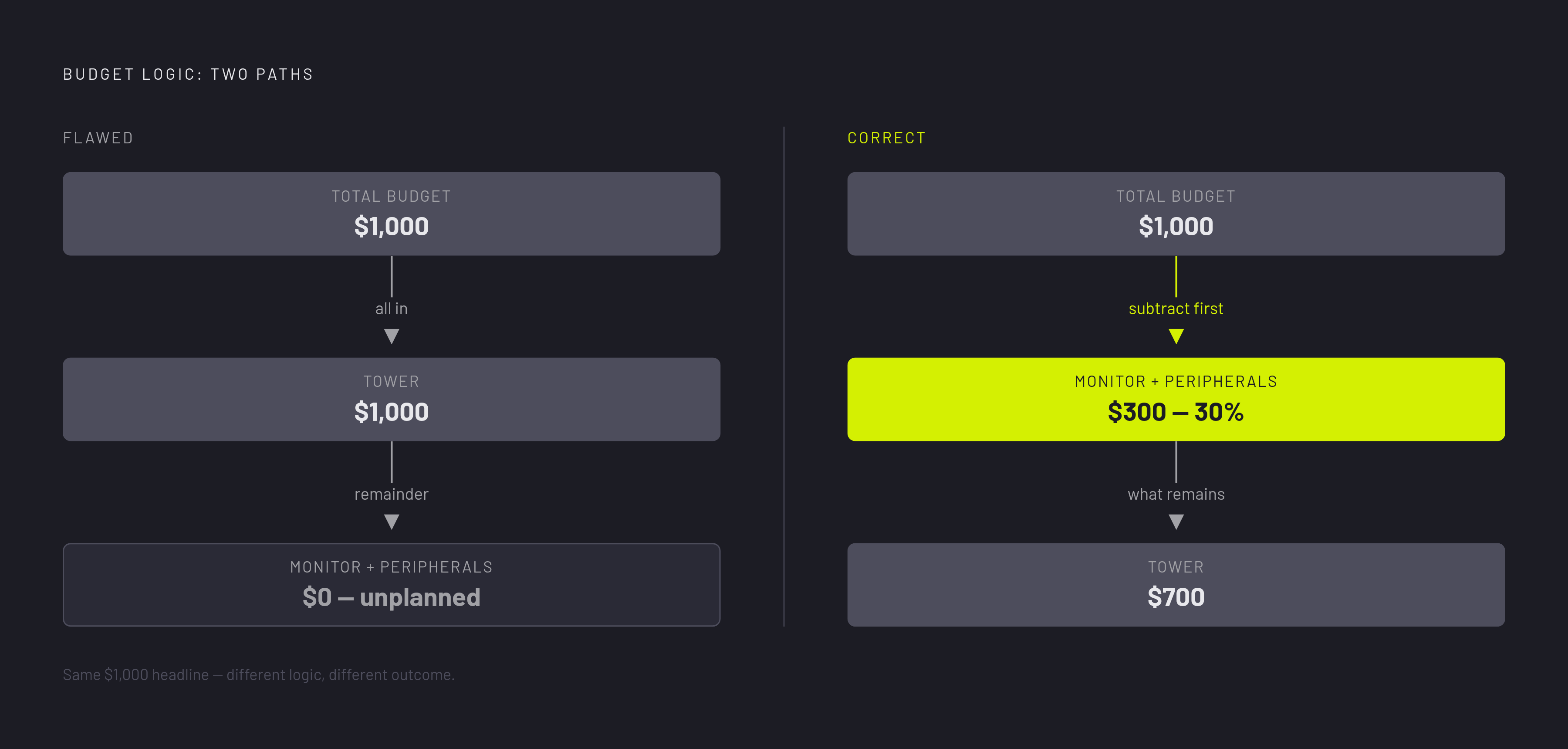
The correct budget logic runs in the opposite direction. When a fixed amount must cover the full setup, the peripheral allocation has to be subtracted before the tower tier is chosen. The tower gets what remains, rather than consuming the headline figure and pushing the rest into an unplanned purchase. AI-assisted configurators face the same problem if they accept a budget without asking what it includes. A conversational interface does not fix an unstated assumption.
What the community is actually running, and what that reveals about the gap
Steam’s adoption data shows that 1080p is still at the heart of the display base in use. Recommendations aimed at more demanding displays do not establish what buyers actually use. When no one asks about the monitor during the build, the builder ends up using the screen they already have. Often, that means a 1080p 60Hz panel from a previous generation.
At the same time, Steam’s GPU adoption data shows that 16GB cards have crossed a meaningful threshold, just edging out 8GB cards for the first time. Peripheral pairing guidance has not kept pace with that shift. VRAM adoption alone cannot tell a builder which monitor is right for a graphics card.
These adoption patterns make the disconnect more than a theoretical concern, though they do not prove that every 1080p setup is mismatched. The display its owner already has may still do what they need. That suitability needs to be examined. The gap between recommendations and adoption is at least partly a planning artifact when builders are guided through a tower upgrade without discussing the display they will keep. Better pairing guidance starts with what people actually run.
The objection that peripherals are preference-driven, and why it only holds for some of them
The strongest objection to integrating peripherals is also reasonable. Keyboard switch feel, mouse shape, headset sound signature, and chair ergonomics depend on the person using them. A technically capable device can still be uncomfortable or unpleasant for a particular buyer. There is no single correct preference to calculate. Treating these choices like a GPU sizing problem would give a configurator more authority than its recommendation deserves.
That concession does not extend to the monitor’s technical constraints. A buyer can like one screen more than another, but that cannot raise a 60Hz refresh limit or make up for too little DisplayPort bandwidth. Resolution, refresh rate, and adaptive sync support still have to match what the GPU is meant to put out. A configurator can check them without pretending to know which keyboard feels best under someone’s hands.
A motherboard with limited USB controller capacity can show increased input latency or audio stutter when several high-polling-rate peripherals and a USB DAC run simultaneously through an unpowered hub. Separate budget pools call for named line items so the builder can see which purchases are covered, rather than a total that silently excludes part of the setup.
What the configurators that have crossed the boundary actually do differently
Some tiered build guides now pair monitor recommendations with their tower tiers. A mid-range tower might receive a 1080p 144Hz IPS recommendation in a moderate price range, while a higher tier gets a 1440p 144–240Hz panel at a higher price. The stated rationale connects the screen to the GPU’s output capability. That is a useful change in scope. The monitor is presented as part of the performance pairing, rather than an unrelated accessory selected after the build is complete.
Some retail bundle configurators make the connection more concrete by putting named GPUs, CPUs, and monitors into a single configuration. Yet both approaches still choose the tower before giving advice on peripherals. Neither brings the peripheral cost into the budget logic when the GPU is being chosen. They answer which monitor belongs with a tower, but not how paying for that monitor should change the tower.
PCGamingTools’ Multi-Monitor Planner is one of the tools that look at desk space and how monitor resolution fits the GPU output. That differs from a tiered guide’s role. One matches tiers of hardware by how well they perform, while the other helps plan where the displays will go. These functions are related, but a monitor recommendation is not a full-desk visualizer, and a layout tool is not automatically a full-setup budget planner.
The contrast with internal simulation is sharp. Tools for planning a tower are getting better at 3D airflow visualization, fan placement modeling, and case-fit checking. The tools check desk space and display resolution, but none of those available model multi-device USB bandwidth. Crossing the chassis boundary therefore means more than adding peripheral products to a catalog. It means deciding which relationships the tool actually models.
What would a planner for the entire desk setup change before buying?
A configurator that treats peripherals as first-class objects would ask about the intended monitor before choosing the GPU. If the builder already owns a display, its specifications would become constraints. If a new display is needed, its cost would enter the budget before the tower tier is set. That changes the starting point of the recommendation. The compatibility pass would then check display connectivity and adaptive sync support with the same purpose that drives checks of PCIe slots and PSU wattage.
The visual layer would make that wider scope tangible. Rendering the monitor, keyboard, and mouse at accurate scale with the tower and desk would show the space the full setup occupies. A component list cannot show that relationship as directly. For someone seeking a visualizer beyond the PC case, full-desk arrangement is therefore a distinct requirement. A battlestation aesthetic planner should make the equipment outside the chassis visible as part of the planned purchase.
The subjective peripherals need a different treatment. A keyboard, mouse, or headset can have its own line in the budget without a false pass-or-fail verdict on compatibility. Ecosystem tradeoffs can also be named plainly. Unified lighting and profile-switching work differently from mixing brands freely, and the builder can choose between them without the tool claiming that one choice is technically correct.
Knowing which resolutions and GPU tiers builders actually use would help a configurator offer pairings that reflect the changing market. That evidence should inform the recommendation alongside the buyer’s requirements. The final test is whether the whole-setup plan can change a tower decision before money is spent. If the monitor, peripheral budget, and desk arrangement arrive only after the GPU is chosen, the tool has merely decorated the build.