Mini-ITX Ecosystem Constraints and Form Factor Trade-Off Analysis
Case volume cascades into every component choice you make.

Mini-ITX's constraints don't sit side by side on a spec sheet, waiting to be checked off one at a time. They interact. A decision made about the case collapses the set of choices available for the cooler, which collapses the choices available for the GPU, which in turn dictates what kind of power supply will physically fit. In Mini-ITX, the planning sequence is the build.
A Different Planning Sequence for Mini-ITX Builds
ATX and Micro-ATX builders can often choose a case last, treating it as a cosmetic wrapper around decisions already made elsewhere. The case holds the parts; it doesn't usually constrain them in any meaningful way, because there's enough internal volume to absorb minor mismatches. Mini-ITX doesn't offer that forgiveness. The case has to come first, because it is what sets cooler height, GPU length, PSU form factor, and even how much clearance there is above the RAM slots, before any other component gets chosen.
The standard sequence taught for ATX builds, pick the CPU, then the GPU, then find a case to fit them, actively works against the builder in ITX. In a small form factor build, following that order makes the failure appear late in assembly, when it's expensive to fix: a cooler that turns out to be 5 mm taller than the case allows, or a graphics card whose length overhangs the power supply shroud by just enough to make the side panel refuse to close. They're the predictable result of applying a sequence that assumes abundant volume to a format that has almost none.
How case volume sets the ceiling for every component decision
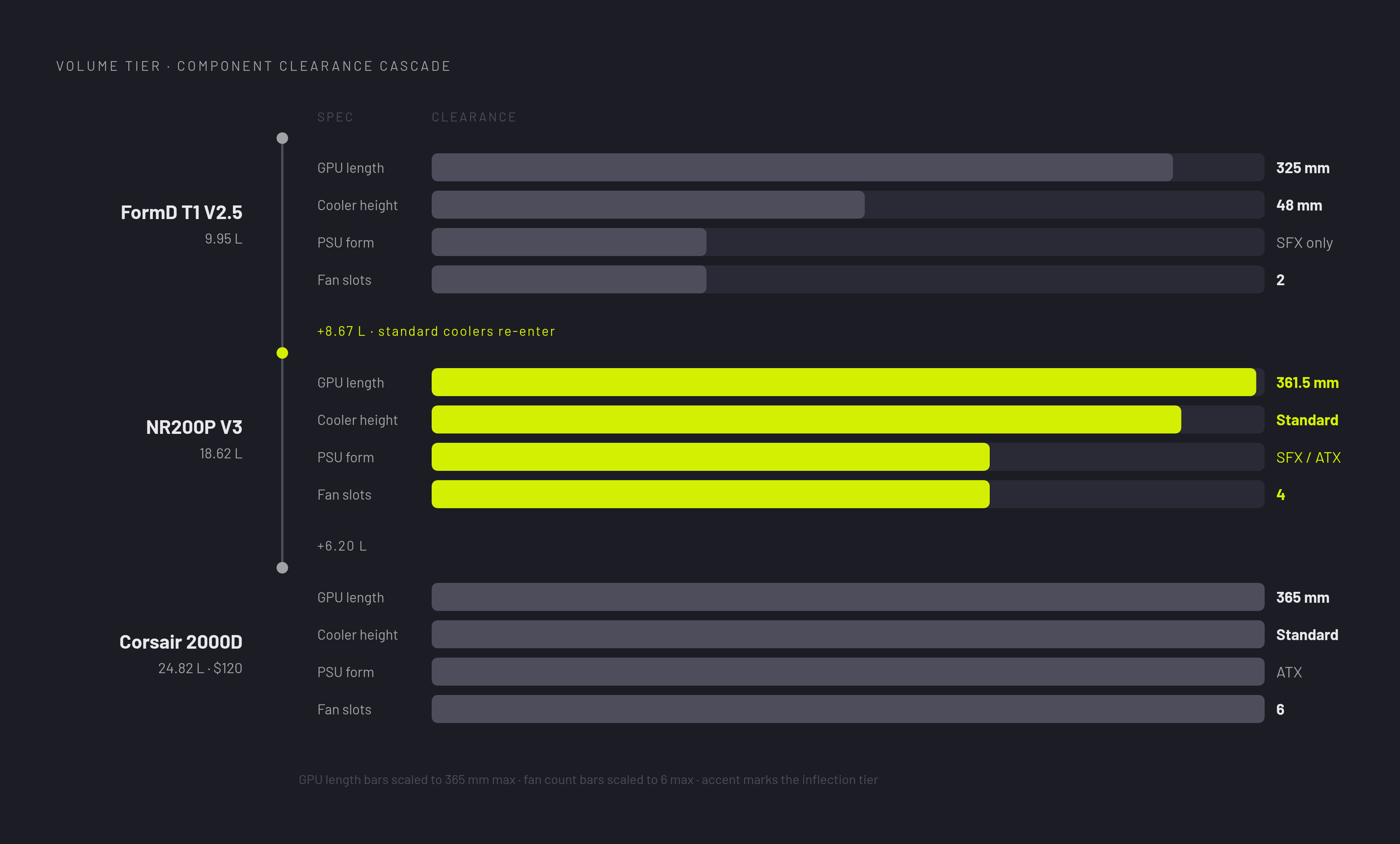
Case volume functions as the master constraint of a Mini-ITX build. It caps cooler height, GPU length, PSU type, and fan count all at once, which makes it the single decision with the most consequences running downstream from it.
Different volume tiers don't just produce smaller or larger versions of the same build. They produce builds that are different in kind. A case like the FormD T1 V2.5, at 9.95 liters, caps GPU length at 325 mm and cooler height at 48 mm, a combination that rules out most standard dual-fan graphics cards and every tower-style air cooler above the low-profile category. In the mid-volume range, something like the Cooler Master NR200P V3 at 18.62 liters, GPU clearance opens up to 361.5 mm and most standard cooler options come back into play. The component menu widens substantially simply by adding a few liters of case volume. Go larger still, to something like the Corsair 2000D Airflow at 24.82 liters, and GPU clearance reaches 365 mm, at a price of $120, which is less than some of the sub-10 liter cases cost. Size and price don't move together in a straight line at the compact end of the market; a larger ITX case can be the cheaper option while still outperforming a smaller one on clearance.
Orientation matters just as much as raw liters. A vertical "tower" chimney case uses convection to pull heat upward, but that same geometry imposes strict limits on cooler height and introduces a real risk of GPU sag over time. A horizontal desktop-style case makes GPU installation and access easier but demands a larger footprint on the desk itself. Neither orientation is simply better; each trades one kind of constraint for another, and the choice has to be made with the rest of the build in mind, not in isolation.
One number on every case spec sheet deserves more skepticism than it usually gets: the advertised maximum GPU length. That published figure is not the usable length. PCIe slot offset and the bend radius required for a riser cable typically eat 15 to 20 mm off the top of it, and builders comparing a card's actual dimensions to the case's printed number need to subtract that margin first, or risk discovering the shortfall with the card half-installed.
Cooler Clearance and Thermal Physics in a Constrained Volume
The cooler height a case allows isn't a cosmetic restriction on which model fits inside. It sets the thermal headroom the CPU has under sustained load, and that headroom caps whether the platform can run a high-TDP processor without throttling.
Heat accumulates faster in a small enclosure than in an ATX tower simply because there's less air to absorb it and less distance for it to travel before it has to leave. Below roughly 8 liters of case volume, pairing anything above a 200-watt GPU with the rest of the system introduces compounding thermal risk. Testing bears this out directly: a Ryzen 7 9700X paired with an RTX 5070 inside a Mini-ITX chassis produced CPU gaming loads of 65 to 75°C, compared to 55 to 65°C in a mid-tower running the same hardware, with GPU junction temperatures landing between 70 and 80°C. Those figures stay within AMD's 95°C Tdie rating for the chip, so the system isn't in danger, but it's consistently running hotter than the same components would in an open-bench setup or a larger case.
Once the case has set the height ceiling, cooler selection stops being a matter of preference. A low-profile air cooler like the Noctua NH-L12S performs reliably in constrained cases, but it represents a thermal ceiling rather than a comfortable margin: pair it with a chip rated at 95 watts or above and the processor may end up power-limiting itself to stay within thermal bounds. A 240 mm all-in-one liquid cooler fits a large majority of ITX cases and restores real thermal headroom, but only if the case has a mounting position for a top or front radiator, and not every ITX enclosure includes one.
RAM height adds a second constraint on top of cooler clearance, one that's easy to miss because it looks unrelated at first glance. Most low-profile coolers only clear DDR5 modules up to 40 mm in height. A tall heat-spreader kit can physically block a cooler from seating properly even when that same cooler has plenty of room to clear the case roof above it. The decision about which memory kit to buy, made late in a build, can quietly undo a cooling decision made early.
The objection that an all-in-one liquid cooler sidesteps this entire clearance problem is partly right, and partly a trap. An AIO still needs a physical radiator mounting position somewhere in the case, and in sub-10 liter enclosures, that mounting position frequently doesn't exist. Liquid cooling doesn't remove the case's authority over the decision; it just moves where that authority gets exercised.
How GPU length and power draw collide with the space and thermal limits already set
Most builders instinctively want to choose the graphics card first, since it's often the most exciting and expensive part of the build. In Mini-ITX, by the time GPU selection actually happens, the case volume, the cooler strategy, and the thermal budget have already ruled out a large share of the available market, including, for most of this hardware generation, the entire flagship tier.
Cards in the RTX 4090 class mostly run longer than 330 mm and draw well above 350 watts, which puts them out of reach for the vast majority of Mini-ITX cases. That exclusion isn't about PCIe slot count. It comes down to physical length and to heat output relative to how much exhaust the enclosure can actually move.
NVIDIA's SFF-Ready program is changing where that upper bound sits. The Gigabyte GeForce RTX 5080 WINDFORCE SFF 16G, reviewed in April 2026, measures a maximum of 304 mm in length and 50 mm in depth to meet the SFF-Ready Enthusiast specification, and it delivers flagship-tier performance, including DLSS 4 and Multi Frame Generation, in a footprint that earlier cases at this performance level simply couldn't accommodate. What makes the program significant is that the SFF-Ready label is turning into a verified compatibility guarantee rather than a builder's own estimate worked out from a tape measure. This marks a real structural shift in how flagship-class GPUs relate to the ITX format.
For most 2026 builds, the practical sweet spot still sits a tier below the flagship cards. A dual-fan RTX 5070, whether the Founders Edition or an AIB variant, typically runs 230 to 250 mm long and fits comfortably in most mid-volume cases. That length is the current balance point between performance and physical compatibility. It shows up as the GPU of choice in benchmarked reference builds for this generation.
The ceiling on overclocking in these builds isn't incidental, it's built into the physics of the enclosure. Fitting a high-core-count CPU alongside a high-TDP GPU in an ITX case typically means capping CPU power somewhere between 65 and 105 watts, which gives up a real share of peak GPU performance in exchange for staying within the thermal limits the case and cooler have already set.
Why PSU form factor is the constraint most builders discover too late
Nearly every Mini-ITX case requires an SFX or SFX-L power supply. It's an easy detail to overlook while planning a build and an expensive one to fix once the case has already been bought and the ATX PSU sitting in a closet turns out not to fit.
The cost premium for going small is genuine. Premium ITX cases and SFX power supplies carry a markup over their standard ATX equivalents, on average, and that markup stacks on top of whatever premium was already paid for the compact case itself and any low-profile or SFF-specific parts chosen to fit inside it. What has changed for the better is wattage. SFX-L units such as the Corsair SF750 and the FSP Hydro G Pro 750W ATX now deliver a stable 750 watts or more with native 12VHPWR support, which closes a gap that used to cap how powerful a GPU an ITX build could realistically run.
PSU placement inside the case can undo a clearance calculation that seemed settled. Some cases mount the power supply at the base of the chassis, which reduces the effective GPU clearance below the figure printed on the spec sheet. A PSU choice made casually, almost as an afterthought once the case and GPU seem locked in, can reopen a compatibility question the builder thought had already been answered. The Corsair SF750 SFX unit is the power supply specified in a benchmarked 2026 reference build priced at $1,373, and it stands as a concrete marker of what wattage tier a build centered on the current sweet-spot GPU actually needs.
Cable management takes noticeably longer in these cases than it does in an ATX build, and the goal is different too. Routing cables in a Mini-ITX case is about making everything physically fit rather than about achieving a clean look behind a panel most people will never open. Modular SFX cables cost more than the fixed cables that ship with a base unit, but they're worth the extra expense in any case under 15 liters, where a stray bundle of cable can block a fan path and undo thermal work done everywhere else in the build.
Where Micro-ATX makes more sense
For a meaningful share of builders, the honest answer to all of the above is to build in a different format instead. Micro-ATX keeps much of the space savings over full ATX while offering meaningfully more internal volume than Mini-ITX, which loosens several constraints at once rather than forcing a builder to negotiate them one at a time. A Micro-ATX case can typically accommodate full-size ATX power supplies, standard tower air coolers, and longer graphics cards without the clearance arithmetic that governs nearly every decision in an ITX build.
The trade-off is size and, in some cases, expansion flexibility: Micro-ATX boards usually offer more PCIe and M.2 slots than Mini-ITX boards, which cap out at a single expansion slot by definition. For someone who values a smaller footprint but doesn't need the absolute minimum volume that Mini-ITX provides, and who doesn't want to treat every component purchase as a test of whether it will physically coexist with the last one, Micro-ATX removes most of the cascading risk this piece has walked through. The constraint cascade that defines Mini-ITX is the price of its footprint, and Micro-ATX exists precisely for builders who've decided that price isn't one they need to pay.