Content Creator PC Builds and the Workstation-Gaming Overlap
GPUs and CPUs designed for gaming now handle professional creative work, blurring the line entirely.

The wall between a gaming PC and a workstation has come down, at least for anyone shopping in the mid-to-high tier, and the reason is architectural rather than marketing spin. Creative software used to be bound by CPU clock speed. That's no longer where the pressure sits: AI-enhanced plugins inside Adobe Premiere Pro and DaVinci Resolve now push their heaviest scene rendering through GPU kernels. The same card drawing frames in a game session at night is doing color grading and effects work the next morning.
The CPU side went through its own quiet shift. AMD's Zen 5 lineup and Intel's Core Ultra chips both now carry dedicated neural engines built to handle machine-learning inference without routing it through the GPU, and that has opened a performance band that simply didn't exist on the last generation of consumer platforms. That tradeoff has narrowed considerably.
None of this erases the old workstation category. Threadripper or Xeon CPUs, certified pro GPUs, ECC memory: that old workstation-only territory still exists, but it's now irrelevant for the vast majority of streamers, video editors, and 3D artists who also game. But for the person who streams three nights a week, cuts 4K timelines on the weekend, and also wants to play the latest release at high settings, that territory is now beside the point. It's built for a workload most consumer builders don't have.
What replaces it is a specific shape of build: a gaming-first CPU with enough cores to grind through render queues, a consumer GPU carrying enough VRAM to keep creative apps fed, and RAM sized to hold both workloads in memory at once without one starving the other. That configuration is the target. Hitting it is about understanding which component is under load during which task, and making sure none of them is the weak link that drags the whole system down. That's the discipline the rest of this piece works through, component by component.
What the mid-to-high tier demands from each component before you plan a build
Every dual-purpose build lives or dies at the component level. A hybrid build lives in the consumer tier's upper band, pairing a gaming-first CPU that can grind through render work with a consumer GPU with enough VRAM for creative apps and enough RAM to keep both sides resident simultaneously. That reframes the whole shopping exercise: not "what's the best CPU," but "what's the CPU that survives my worst rendering day and my most demanding game session, at the same time."
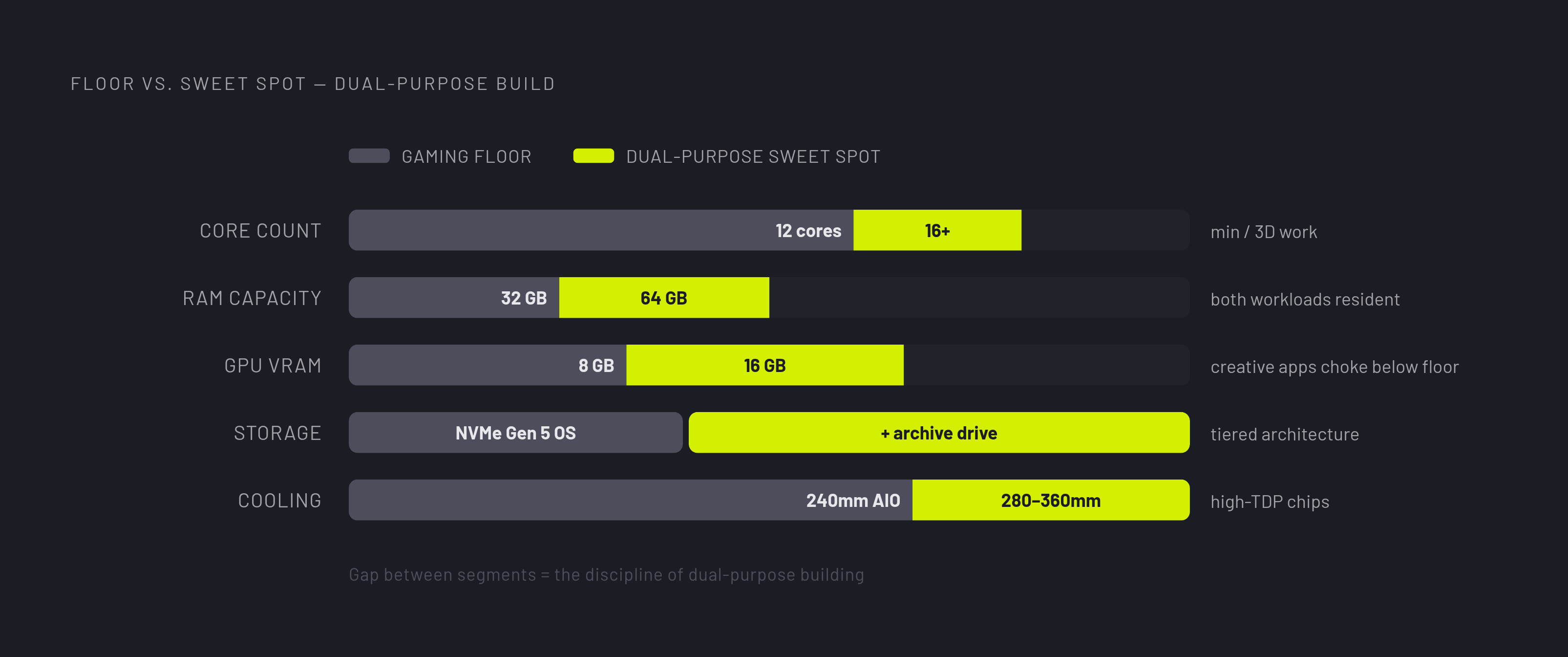
Core count is the first filter on the CPU side. Twelve cores is the practical floor for serious creative work in 2026, and anything touching 3D rendering with regularity should be aiming for sixteen or more. Gaming alone rarely needs that many cores. A gaming-only chip can quietly become the bottleneck the moment Blender or a heavy Premiere timeline gets opened.
RAM follows a similar logic, just measured differently. A content creation machine needs a real baseline just to stay comfortable, a noticeably higher amount to run most workflows without friction, and video editors or 3D artists working with large scene files should be planning for more still. GPU VRAM works the same way: fall under a certain floor and creative apps start choking regardless of how fast the core itself is, while a higher VRAM tier becomes the practical sweet spot for serious 3D and video work, with the flagship-class cards reserved for builders who want no compromises at all.
Storage and cooling round out the list, and both get skipped more often than they should. Pairing a fast NVMe Gen 5 drive for the OS and active applications with a second drive for project files avoids the I/O contention that comes from asking one drive to do both jobs at once, a mistake documented often enough to name directly. Cooling matters because sustained creative workloads generate sustained heat that gaming sessions rarely do: a 280mm or 360mm AIO, or a high-end tower air cooler, is recommended for sustained creative workloads on high-TDP chips, while a quality 240mm AIO or dual-tower air cooler may suffice for upper-mid-range CPUs below roughly 200W. Keep these five criteria in mind, core count, RAM capacity, VRAM floor, storage architecture, and cooling headroom, and every component decision that follows becomes a matter of checking a part against a known bar rather than guessing.
The CPU decision: when a gaming chip is enough
For most dual-purpose builders in 2026, a high-end consumer CPU clears both the gaming and creative bars; only specialized sustained rendering workloads justify moving to a dedicated workstation platform. That's a genuine fork in the road, though, not a footnote. The chip a builder picks here determines how much headroom exists on the creative side for the life of the system.
AMD's Ryzen 9 9950X3D sits at the top of the hybrid argument for a reason: it's a 16-core CPU with 3D V-Cache, and AMD itself positions the chip as a strong choice for users who want one PC for gaming and professional work. Compare that to the Ryzen 7 9850X3D, which is the sharper pure-gaming chip thanks to its own V-Cache implementation, with the Ryzen 7 9800X3D still standing as the smarter value pick for gaming alone. Both are excellent gaming chips. Neither carries the core count to compete with the 9950X3D once the workload shifts to heavy creative rendering, which is exactly the tradeoff a builder needs to price in before choosing one.
The AMD vs. Intel platform question is genuinely unresolved: pure Blender renders still favor AMD slightly, though the gap has narrowed considerably, while Intel's NPU advantage is real for AI-assisted creative tools. Neither platform is the wrong answer in 2026. The right one depends on what software actually anchors the build.
Platform longevity deserves a mention too, because it changes the math on a tight budget. AMD's AM5 platform has a confirmed upgrade path: a motherboard purchased today will likely support next-generation CPUs, a meaningful factor when the budget is tight and the CPU is the most likely upgrade candidate. Threadripper and Xeon remain on the table for the narrow slice of builders running sustained professional render pipelines, but for nearly everyone reading this, that's not the fight worth having.
The GPU decision: VRAM floor, creative acceleration, and the supply reality builders face right now
No component sits closer to the center of the convergence argument than the GPU, and no component makes that argument harder to act on right now. Supply constraints layered on top of AI-driven demand have pushed the cards best suited to dual-purpose builds into the hardest tier to actually buy at a reasonable price.
At the top end, the RTX 5090 isn't just a gaming flagship. It carries three 9th-generation NVIDIA encoders that outrun software encoding by a wide margin, and its decoders can handle several simultaneous 4K30 streams at once, features that matter directly to anyone streaming or cutting video rather than just anyone chasing frame rates. That's a card built for exactly the dual-purpose workload this piece is describing.
The realistic mid-tier answer is the RTX 5070 12GB, which shows up in Tech Buyer's Guru's June 2026 creator build for good reason: it provides GPU acceleration in DaVinci Resolve, Premiere Pro, and Photoshop, runs efficiently enough to support up to four monitors, and keeps noise low (a real workstation consideration). Further down the budget ladder, the RX 7600 XT with 16GB VRAM appears across multiple budget builds as a meaningful choice for GPU-accelerated effects in Premiere Pro and DaVinci Resolve, for creators who also game at moderate settings.
The gap between coverage and reality gets stark. The RTX 5090 also encodes video far faster than software encoders via three 9th Gen NVIDIA encoders, and can decode multiple simultaneous 4K30 streams per decoder, directly relevant to streaming and editing workflows. The 5070 and cards like the 7600 XT are what's actually landing on desks.
Pricing is the harder problem, and it isn't going away soon. RTX 5090 street prices are expected to stay well above MSRP through most of 2027; the card is simultaneously the best dual-purpose GPU and the hardest to acquire at anything near MSRP. Part of that is structural: reporting traced to hardware leaker Kepler_L2 on the AnandTech forum indicates Nvidia's next GPU generation, along with most of AMD's RDNA 5 lineup, won't ship until 2028, with only the AT2 chip arriving in 2027, a full year later than the industry had expected. That means the current RTX 50 generation faces no successor pressure for a while yet, so today's pricing isn't a temporary blip waiting for a new generation to correct it. Builders planning a GPU purchase should treat street price, not launch MSRP, as the real baseline, and a live, multi-retailer price comparison tool is worth checking regularly rather than assuming prices will settle back down on their own. RTX 5080 adoption stood at just a small fraction of gaming systems as of April 2026, illustrating the gap between what review coverage focuses on and what builders are actually deploying.
RAM and storage: the component pair that builders consistently underspec for creative workloads
RAM and storage get treated as an afterthought in most gaming builds, and that habit breaks a creative workflow first. In 2026 the problem has a second layer: both components are also the most expensive they've been in recent memory, which makes the gap between what a creator build actually needs and what a typical gaming build ships with both wider and costlier to close.
That part hasn't changed. What's changed is what that memory costs. A retail survey run by 3DCenter found its DDR5 price index had climbed to roughly 4.9 times where it sat in July 2025, as AI data centers have been absorbing manufacturing capacity that used to flow to consumer memory. That's a substantial jump. It's a market reshaping itself around a completely different buyer.
Real builds show this effect directly. Tech Buyer's Guru's build dropped from a planned 64GB configuration down to 32GB, with the note that more can be added later once prices settle, a direct concession to the market rather than a change in what the build actually needs. A hybrid build needs enough RAM to keep both gaming and creative sides resident simultaneously.
Pairing a fast PCIe Gen 5 NVMe drive, the SABRENT Rocket 5 2TB appears in Tech Buyer's Guru's June 2026 build rated at 14GB/s sequential read, for the OS and active project files with a second drive for archives is the recommended configuration. Pricing has moved here too: a 2TB Gen 4 drive that sold for a modest amount in 2025 now lists considerably higher at many retailers. That's pushed a genuinely useful compromise back into style, spinning hard drives as bulk archive storage. DDR5 is the undisputed standard for any new build in 2026, and the sweet spot for AMD AM5 platform performance is DDR5-6000, which runs in 1:1 sync with the memory controller.
How the budget tiers stack up when component prices reflect 2026 reality
Applying all of this to actual dollar figures is where the 2026 market gets uncomfortable.
It's a legitimate entry point, and the secondary HDD for archive storage is exactly the kind of practical compromise discussed above rather than a corner cut carelessly. Per PCWorld, a solid gaming build that once landed comfortably under a modest price threshold now costs considerably more to assemble, which tells you the budget tier hasn't stayed put even as it's held onto the same component categories.
The mid-range tier is where the dual-purpose argument actually lives most comfortably; this is the RTX 5070 and Ryzen 9950X3D territory discussed above, where core count, VRAM, and RAM capacity all clear the bar for both gaming and creative work without demanding flagship pricing. A builder with any flexibility in the budget should plan toward this band.
At the top, the price inflation is the sharpest. A Tom's Hardware dream build has climbed to more than double its original target price as configured, the clearest single illustration available of how far the goalposts have moved at the high end. And the RTX 5090, the card that makes the strongest case as a dual-purpose flagship thanks to its encoding and decoding capability, remains priced well above MSRP through most of 2027 by most forecasts, and the best GPU for this exact use case is also the one builders are least likely to land at a fair price. Anyone shopping at this tier should treat live, multi-retailer pricing data as a planning tool rather than checking prices once and building a budget around a number that may not hold a week later.